Call us 011 2577877
Trade-in | Buyback Offer
FLASH SALE:Up to 50% off on Prime lens fungus cleaning
Call us 011 2577877

Nikon ZR Video Samples

සත්‍ය පරීක්ෂණ සඳහා සත්‍ය වීඩියෝ දත්ත

Nikon ZR කැමරාව RED නිෂ්පාදන පේළියේ බාහිරව පළමු වරට R3D NE RAW ආකෘතියෙන් වීඩියෝ ගැනීමට හැකි කැමරාවයි. මෙය RED නාමිකව ඇති වර්ණ තාක්ෂණය හා Nikonගේ Cinema පද්ධතිය එකට එක් කරන නව ආකෘතියක්. දැන් Nikon තවත් පියවරක් ගෙන, තමාගේ නිල Z CINEMA පිටුවෙන් සම්පූර්ණ-resolution R3D ගොනු ලබා දී ඇත. ඒ ගොනු මෙතැනින් ලබා ගත හැක: Download Nikon ZR R3D samples.

එම වීඩියෝ DaVinci Resolve වගේ විශේෂඥ සංස්කරණ මෘදුකාංගවලින් විවෘත කරලා, highlight recovery, shadow depth, color grading, හා noise control වගේ දේවල් අත්හදා බලන්න පුළුවන්. මේවා සම්පූර්ණ 12-bit 6K RAW ගොනු වන අතර, සංයුක්ත (compressed) ප්‍රචාරක වීඩියෝ නොවෙයි. එබැවින් ඔබට පූර්ණ නිදහසකින් පරීක්ෂා කර බලන්න හැකියාව ලැබෙනවා.


RED සමඟ සෘජු තරඟයක්

මේ නිකුතුව විශේෂ කරන්නේ Nikon එක RED Komodo X සහ RED V-Raptor X කැමරා වලින් එකම තත්ත්වයන් යටතේ ගැනූ R3D ගොනුත් එක්ක ලබා දී ඇති නිසාය. ඒ කියන්නේ, Nikon ZR කැමරාව RED කැමරා දෙකත් එක්ක එකම දර්ශනයකට, එකම ආලෝකය යටතේ, එකම workflow එකක් භාවිතා කරමින් සෘජුවම බලන්න පුළුවන් කියන එකයි.

මෙමගින් චිත්‍රපට නිර්මාපකයන්ට Nikonගේ REDWideGamutRGB හා Log3G10 pipeline එක RED එකේ වර්ණ හා tone හැසිරීම සමඟ කොපමණ ගැලපෙනද බලන්න පුළුවන්. මෙය Nikonගේ පළමු cinema කැමරාව RED කැමරා සමඟ සෘජුවම පරීක්ෂා කිරීමට ලැබෙන අනූනාවක් නැති අවස්ථාවකි.


ඔබටත් අත්හදා බලන්න හැටි

  1. Nikon Z CINEMA ZR features පිටුවට යන්න
  2. R3D NE sample packages බාගන්න (chroma key, skin tone, LUT, low-light scenes ඇතුළත්)
  3. ඔබ කැමති NLE මෘදුකාංගයකින් ගොනු විවෘත කර grading පටන් ගන්න
  4. Nikon ZR සහ RED Komodo X / Raptor X footage එකට එකම color setting වලින් සංසන්දනය කරන්න

මේක වැදගත් වෙන හේතුව

මිලදී ගැනීමට පෙර නිෂ්පාදකයින්ට R3D RAW වීඩියෝ අත්හදා බලන්න ඉඩ දීම Nikon විසින් ගත් ආරක්‍ෂා සහ විවෘත පියවරක්. මෙය Nikonට තම කැමරාවේ හැකියාව පිළිබඳ විශ්වාසය ඇති බව පෙන්වයි.

එකම වේලාවේ Nikon සහ RED අතර අලුත් සහයෝගීතාවක් ඇතිවී ඇති බවත් පෙන්වයි. විඩියෝ සංස්කාරකයන්ට, වර්ණ විශේෂඥයන්ට, සහ සිනමා ඡායාරූප ශිල්පීන්ට මෙය Nikon වර්ණ තාක්ෂණය RED වර්ණ පද්ධතියට සමීපව අත්විඳීමට ලැබෙන අනූනාවක් නැති අවස්ථාවකි.

Nikon Z5 II — ඔබේ නිර්මාණශීලීත්වයට අලුත් අත්දැකීමක්

Nikon Z5 II යනු නව පරපුරේ mirrorless full-frame කැමරාවකි, Nikon Z පවුලේ සාර්ථකතම මොඩලයක් ලෙස. EXPEED 7 ප්‍රොසෙසරය, අභ්‍යන්තර N-RAW වීඩියෝ හැකියාව, නව Autofocus පද්ධතිය සහ ඉතා පැහැදිලි රූප තත්ත්වය නිසා, ඕනෑම ඡායාරූප ශිල්පියෙකුට හෝ වීඩියෝ නිෂ්පාදකයෙකුට මෙය ඉතා අගනා ආයෝජනයකි.


⚙️ ප්‍රධාන විශේෂාංග

  • 24.5MP Full-Frame BSI-CMOS Sensor
  • EXPEED 7 ප්‍රොසෙසරය — Z8 සහ Z9 මට්ටමේම බලය
  • ISO 100–64,000 – අඳුරු තත්ත්වයන්හිදීත් noise අඩු
  • 5-axis In-Body VR (7.5 stops)
  • 4K UHD 60p වීඩියෝ සහ 12-bit N-RAW අභ්‍යන්තර වීඩියෝ සටහන් කිරීම
  • Dual SD (UHS-II) card slots
  • Pre-Release Capture සහ Deep Learning AF

🎥 EXPEED 7 සහ RAW වීඩියෝ බලය

Z5 II හි EXPEED 7 ප්‍රොසෙසරය ඔබේ රූප හා වීඩියෝවල තත්ත්වය නව මට්ටමකට ගෙනයයි.
මෙම නව ප්‍රොසෙසරය මගින් ඔබට:

  • RAW වීඩියෝවක් 12-bit N-RAW ආකෘතියෙන් අභ්‍යන්තරව සටහන් කළ හැක.
  • Dynamic range වැඩි කර වර්ණ ගැඹුර සහ සවිස්තර රඳා ගන්න.
  • High ISO වලදීත් විස්තර අහිමි නොවී නව රූප ගුණාත්මකතාව ලබා ගන්න.
  • Pre-Release Capture භාවිතා කර, අවසන් මොහොතකට පෙරත් රූප රැස් කරන්න.

📸 Image Quality සහ “Image Recipes” නව අත්දැකීම

Z5 II හි ලස්සනම නව අංගයක් වන්නේ Image Recipes විශේෂාංගයයි.
මෙය Nikon විසින් නිර්මාණය කළ නව පද්ධතියකි — එහි මගින් ඔබට පහසු වන්නේ:

  1. ඔන්ලයින් Image Recipes වෙබ් සේවාවට (Nikon Picture Control Utility හෝ NX Studio) පිවිස,
  2. ඔබට කැමති වර්ණ ශෛලිය, contrast, tone, hue, sharpness වැනි ගුණාංග සැකසීම,
  3. එම custom preset එක download කර,
  4. Wi-Fi හෝ memory card මඟින් කැමරාවට උඩුගත කිරීම.

මෙම ක්‍රමය මගින්, ඔබට එකම කැමරාවෙන් විවිධ “looks” ලබාගත හැක — උදාහරණ ලෙස cinematic, vivid, pastel, black & white, warm tone වැනි.

ඔබට විශේෂයෙන් ඔබේ නිර්මාණශීලී ගැටළුවට ගැලපෙන color preset එකක් නිර්මාණය කර, එය ඔබේ Z5 II හි Picture Control මෙනුවට එක් කළ හැක.

📌 Photo Technica හි විශේෂඥයන් විසින්ද ඔබට “Image Recipe” සැකසුම් සහ color profiles සැලසීමේදී උපදෙස් ලබා දිය හැක.


💡 නිර්මාණශීලීත්වය අත්දැකීමට නිර්මාණය වූ කැමරාවක්

Z5 II යනු Nikon එකේ mirrorless පරපුරේ අලුත් අරුතක්.
ඔබට මෙම කැමරාවෙන් හැකි වන්නේ:

  • සිත්ගන්නාසුළු bokeh සහ sharpness සමග portraits ලබාගැනීම.
  • 4K වීඩියෝවකින් නිර්මාණශීලී ව්ලාග් හෝ documentary නිෂ්පාදන නිර්මාණය කිරීම.
  • High ISO low light photography අත්විඳීම.
  • “Image Recipes” මගින් තමන්ටම අනන්‍ය color mood එකක් නිර්මාණය කිරීම.

ඔබේ නිර්මාණශීලී ඉලක්කය සඳහා Z5 II හි වාසි

මෙහි කීපයක් සිතන්න:

  1. සිදුවීම් හී බිඳීමක් නොමැති අවස්ථා (“decisive moments”) සඳහා Pre-Release Capture යොදා ගැනීම — ඔබ ශට්ටරය ඔබාවූකමට පෙර රූප පිටපත් රඳාගන්නේය.
  2. Video + Photo එකම කැමරාවෙන් — RAW ශෛලියේ වීඩියෝ + තත්ත්ව රූප එකම උපකරණයෙන් ලබාගත හැක.
  3. අඳුරු ඉන්ද්‍රජාල සැකසුම් — ISO 64,000–ගත තත්වයන්හි දී noise අඩු ලෙස රූප ගුණාත්මකතාව රඳා ගැනීම.
  4. ලස්සන නිර්මාණශීලී නිෂ්පාදනය — Color Control presets සහ Picture Control බොත්තම ඔබේ රූප ශෛලයට අනුව වර්ණවල සැකසුම් පහසුවෙන් තෝරාගන්න.
  5. ස්ථාවර පැහැදිලි රූප — 7.5 ස්ටොප් VR ඒකකය නිසා, ඔබට තනි හස්තයෙන් ද ස්ථායී රූප ලබා ගැනීමේ හැකියාව ඇත.
  6. ආරක්ෂිත හා කාලෝචිත පටිගත කිරීම් — කාඩ් කට්ටල දෙකක් (dual SD slots) සහ ලොංග් වීඩියෝ සටහන් කිරීමේ හැකියාව.

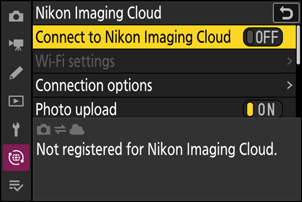
Nikon Imaging Cloud භාවිතා කිරීම සඳහා අවශ්‍ය පියවර

  • සේවාව භාවිතා කිරීමට Nikon ID එකක් සෑදිය යුතුය සහ Nikon Imaging Cloud සමඟ ලියාපදිංචි විය යුතුය. https://imagingcloud.nikon.com/
  • ලියාපදිංචිය සම්පූර්ණ කර කම්පියුටරයක හෝ smart device එකකින් sign in වන්න, කැමරාව සම්බන්ධ කිරීමට පෙර.
  • සවිස්තරාත්මක උපදෙස් සඳහා Nikon Imaging Cloud online help බලන්න.

අමතර අවශ්‍යතා:

  • Nikon Imaging Cloud භාවිතා කිරීමට Web Browser අවශ්‍ය වේ.
  • කැමරාව සහ Nikon Imaging Cloud සම්බන්ධ කිරීමට Wi-Fi අවශ්‍ය වේ.
  • කැමරාව දැනට තිබෙන ජාලයක (ගෘහ ජාල ඇතුළු) සම්බන්ධ කරගැනීමට wireless router එකක් භාවිතා කරන්න.

කැමරාව සම්බන්ධ කිරීම – Nikon Imaging Cloud

කැමරාව:
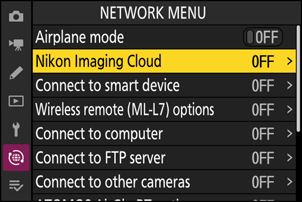
Network menu එකේ [Nikon Imaging Cloud] තෝරන්න සහ 2 ඔබන්න.

කම්පියුටරයක හෝ smart device එකකින් Nikon Imaging Cloud වෙත ප්‍රවේශ වීමට QR කේතයක් සහ URL එකක් පෙනේ.

කැමරාව:
පෙන්වන dialog එකේදී, OK Button  ඔබන්න.

කැමරාව:
[Connect to Nikon Imaging Cloud] සඳහා [ON] තෝරන්න.

කැමරාව:
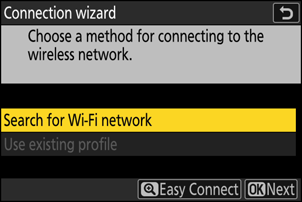
[Search for Wi-Fi network] තෝරන්න සහ OK Button ඔබන්න.

කැමරාව අවට ක්‍රියාත්මක Wi-Fi ජාල සෙවීම ආරම්භ කරයි සහ නාමය (SSID) අනුව ලැයිස්තු ගනී.


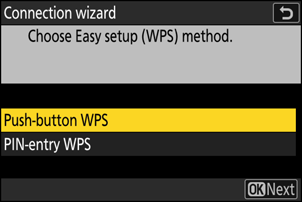
“Easy Connect” (පහසු සම්බන්ධය)

SSID හෝ Encryption Key එකක් ඇතුළත් නොකර සම්බන්ධ වීමට, Step 4 හිදී Zoom + Button ඔබන්න. පසුව පහත විකල්ප වලින් එකක් තෝරන්න සහ OK Button ඔබන්න. සම්බන්ධ වූ පසු Step 7 වෙත යන්න.

විකල්පයවිස්තරය
[Push-button WPS]Push-button WPS සහාය දක්වන Routers සඳහා. Router එකේ WPS බොත්තම ඔබන්න, පසුව කැමරාවේ OK Button ඔබන්න.
[PIN-entry WPS]කැමරාව PIN එකක් පෙන්වයි. එය පරිගණකයක් භාවිතා කර Router එකේ ඇතුල් කරන්න. Router ලිපිගොනුව බලන්න.

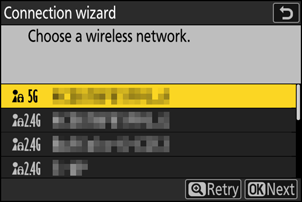
ජාලයක් තෝරාගැනීම

  • ජාල SSID එක තෝරන්න සහ OK Button ඔබන්න.
  • කැමරාවෙන් ඇතුළත් කළ නොහැකි අක්ෂර සහිත SSID නොපෙනේ.
  • Band එක සංකේතයක් ලෙස පෙන්වයි.
  • ආරක්ෂිත ජාල (Lock Icon) සංකේතයෙන් පෙන්වයි. එවැනි එකක් තෝරන විට Encryption Key එක ඇතුල් කරන්න.
  • අරක්ෂිත ජාල සඳහා, Step 8 වෙත යන්න.
  • අවශ්‍ය ජාලය නොපෙනේ නම්, Zoom + Button ඔබා නැවත සෙවීම කරන්න.

Hidden SSIDs:

  • Hidden SSID ජාල හිස් entry ලෙස පෙන්වයි.
  • එවැනි entry තෝරන්න සහ OK Button දෙවරක් ඔබන්න.
  • පසුව SSID එක ඇතුල් කරන්න. Zoom + Button ඔබන්න.
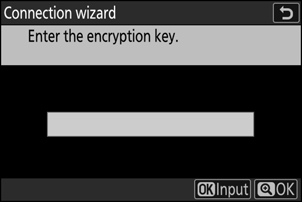
  • Encryption Key එක ඇතුල් කරන්න.

Encryption Key ඇතුළත් කිරීම

  • OK Button ඔබා Encryption Key එක ඇතුල් කරන්න.
  • සම්පූර්ණ වූ විට OK Button ඔබන්න.
  • Zoom + Button යලි ඔබා සම්බන්ධතාවය ආරම්භ කරන්න. සම්බන්ධ වූ විට පණිවිඩයක් පෙන්වයි.

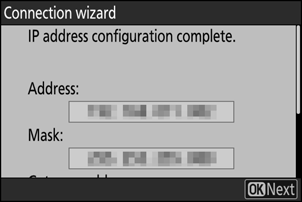
IP ලිපිනය ලබාගැනීම / ඇතුල් කිරීම

විකල්ප:

  • [Obtain automatically] – ජාලය IP ලිපිනය ස්වයංක්‍රීයව ලබා දේ. සම්පූර්ණ වූ පසු “configuration complete” පණිවිඩයක් පෙන්වයි.
  • [Enter manually] – IP Address, Subnet Mask, Gateway Address, DNS ලිපිනය මැනුවල් ලෙස ඇතුල් කරන්න.

කැමරාව:
“configuration complete” පණිවිඩය පෙන්වූ විට OK Button ඔබන්න.


Nikon Imaging Cloud සම්බන්ධය සකස් කිරීම

කැමරාව Nikon Imaging Cloud වෙත සම්බන්ධ වීමට සූදානම් කර QR කේතයක් සහ URL එකක් පෙන්වයි.

Computer/smart device:
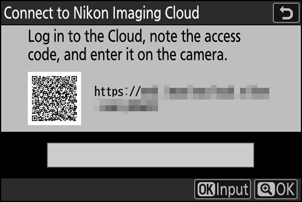
Nikon Imaging Cloud මුල් පිටුවේ connect camera බොත්තම ඔබන්න. Access code එකක් පෙනේ.

කැමරාව:
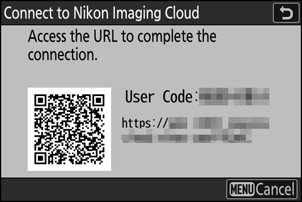
Access code එක ඇතුල් කරන්න. OK Button ඔබා, පසුව Zoom + Button ඔබන්න. සම්බන්ධ වූ විට QR කේතයක් සහ URL එක නැවත පෙන්වයි.

Computer/smart device:
කැමරාවේ පෙන්වෙන QR කේතය scan කරන්න හෝ URL එක browser එකේ ඇතුල් කරන්න.

  • Connection confirmation screen පෙන්වයි.
  • User-code entry screen පෙනේ නම්, කැමරාවේ පෙන්වෙන code එක ඇතුල් කරන්න.
  • [Connect] ඔබන්න.

සම්බන්ධතාව සම්පූර්ණය

Nikon Imaging Cloud සහ කැමරාව දැන් Wi-Fi හරහා සම්බන්ධ වී ඇත.
Computer/smart device එකේ සහ කැමරාවේ “connection complete” පණිවිඩය පෙනේ නම්, ඔබට දැන් Nikon Imaging Cloud සමග කැමරාව භාවිතා කළ හැක.

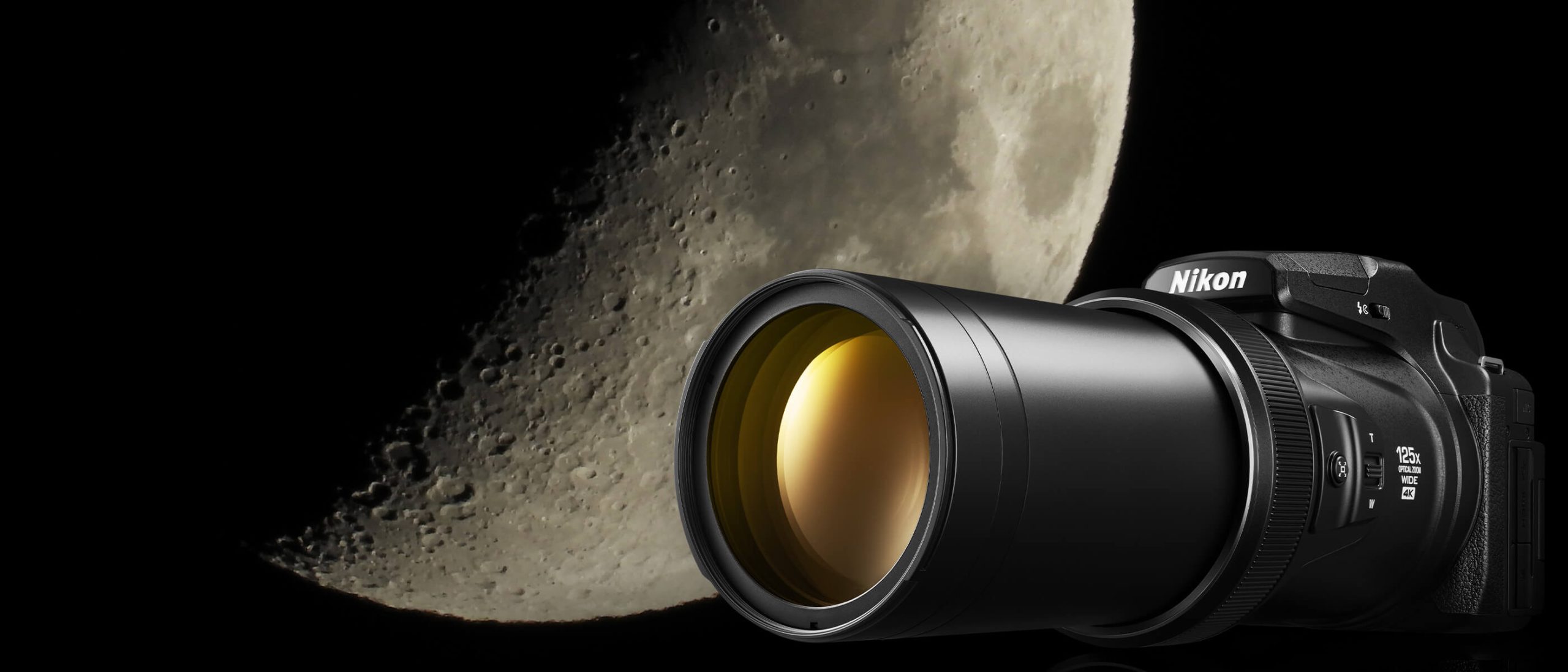
Nikon Coolpix P1100 – The Ultimate Super-Zoom Camera in Sri Lanka (2025 Guide)

When it comes to zoom power, nothing beats Nikon’s Coolpix P series. The all-new Nikon Coolpix P1100 takes things even further, giving photographers and videographers an unbelievable reach without the need for heavy telephoto lenses.

As the official Nikon distributor in Sri Lanka, Photo Technica is excited to introduce the Nikon P1100, the ultimate bridge camera for wildlife, travel, and astronomy enthusiasts.


Why the Nikon Coolpix P1100 is Special

Unlike DSLRs or mirrorless cameras, the P1100 is an all-in-one super-zoom camera — no need to change lenses. It combines convenience with power, making it perfect for Sri Lankan photographers who want reach without carrying multiple lenses.

  • 125x Optical Zoom (24–3000mm equivalent) – Reach subjects kilometers away.
  • 16–20MP Sensor – Optimized for sharp details even at extreme zoom.
  • RAW Image Support – Gives advanced users full control over editing.
  • 4K UHD Video Recording – Perfect for wildlife documentaries and YouTube.
  • VR (Vibration Reduction) – Steady shots even at maximum zoom.
  • Time-Lapse & Moon/Astro Modes – Capture stunning night skies.

Who Should Buy the Nikon Coolpix P1100?

🦅 Wildlife Enthusiasts

Perfect for birdwatching in Sri Lanka’s wetlands, spotting elephants in Minneriya, or leopards in Yala.

🌙 Astronomy Lovers

Capture detailed shots of the moon and planets without a telescope.

🌴 Travelers & Safari Photographers

One compact camera gives you wide-angle landscapes and extreme zoom for distant subjects.

🎥 Content Creators

4K video and time-lapse features make the P1100 a great tool for travel vlogs and wildlife YouTube channels.


📊 Nikon P1100 vs P1000 – What’s New?

FeatureNikon P1000Nikon P1100
Optical Zoom125x (24–3000mm)125x (improved optics & clarity)
Sensor16MPUpgraded 20MP (better detail)
ProcessorEXPEED 4EXPEED 7 (faster, better low light)
Video4K at 30p4K at 60p + improved stabilization
Weight1415gSlightly lighter, better grip

👉 With its improved image processor and stabilization, the P1100 is sharper, faster, and better for video than its predecessor.


Why Buy the Nikon Coolpix P1100 in Sri Lanka from Photo Technica?

  • Official Nikon Distributor – 100% genuine products.
  • Warranty & Service – Backed by Nikon Sri Lanka Service Center.
  • Expert Guidance – Our staff will help you unlock the full potential of the P1100.
  • Exclusive Workshops – Learn wildlife and super-zoom photography at Nikon School events.

📍 Showroom & Service Center
288, Galle Road, Colombo 03

📞 Sales Contacts:

  • 0768957777
  • 0761996555

🌐 Visit: www.phototechnicasl.com

World Photography Day – Capture Your Future with Nikon

We all love to capture the special moments in life. Whether it’s a wedding, a journey, a moment with friends, or the breathtaking wildlife of Sri Lanka – photography makes those memories last forever.

On August 19, 2025, the world celebrates World Photography Day, a global tribute to the art of capturing moments. With Nikon, you can bring together your creative vision and cutting-edge technology to turn every click into a masterpiece.


Capture the Future with Nikon

  • Nikon Z Series Mirrorless – Fast, powerful, and built for the next generation of photographers.
  • Nikon Lenses – From landscapes to portraits, there’s a lens for every story.
  • Nikon Service Center Colombo – Keep your gear safe and reliable with Nikon-certified care.

👉 Photo Technica, as the official distributor and service center for Nikon Sri Lanka, gives you genuine products, warranty, and expert guidance.


Nikon School Workshops – Take Your Vision Further

Through Nikon School workshops, both beginners and professionals can explore new techniques and elevate their photography.

📸 Wildlife, Landscape, Portrait, Videography – wherever your passion takes you, Nikon will be there.


Conclusion

This World Photography Day, take your camera and capture your future with Nikon. Visit our showroom, explore the latest Nikon cameras and lenses, and join the Nikon family in Sri Lanka.

📍 288, Galle Road, Colombo 03
📞 0768957777 | 0761996555
📞 Service – 0765269736
🌐 www.phototechnicasl.com


Hashtags

#WorldPhotographyDay #NikonSriLanka #PhotoTechnica #NikonSchool #NikonZSeries #CameraSriLanka #PhotographySL

Best Nikon Lenses for Wildlife Photography in Sri Lanka (2025 Guide)

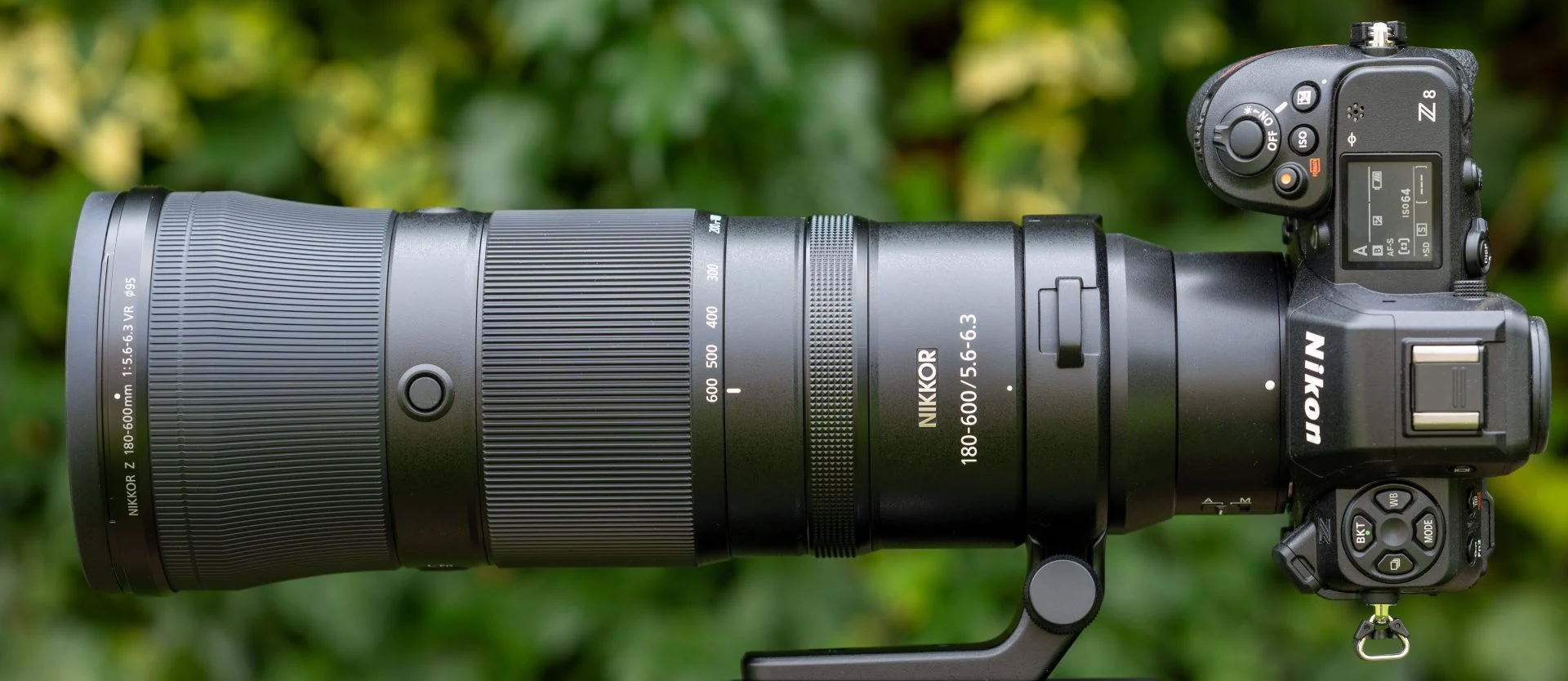
Sri Lanka is blessed with incredible wildlife — from the majestic elephants in Minneriya to leopards in Yala, and the beautiful birdlife across our national parks. To capture these moments, the right camera is important, but the lens makes all the difference.

As the official Nikon distributor in Sri Lanka, Photo Technica is here to guide you through the best Nikon lenses for wildlife photography in 2025. Whether you’re a beginner or a professional, these lenses will help you capture stunning wildlife shots.


Why Choose Nikon Lenses for Wildlife?

  • Unmatched Optical Quality – Sharp details, even in challenging conditions.
  • Durability – Weather-sealed for shooting outdoors.
  • Versatility – Wide range of telephoto and zoom lenses to suit every budget.
  • Warranty & Support in Sri Lanka – Buy with confidence from Photo Technica, the official Nikon distributor.

Best Nikon Lenses for Wildlife Photography (2025)

Nikon Z 100-400mm f/4.5-5.6 VR S – The All-Rounder

  • Perfect for safaris and birdwatching.
  • Incredible sharpness throughout the zoom range.
  • Lightweight for a super-telephoto zoom.
  • Fast autofocus with excellent tracking.

👉 Great for photographers who want flexibility for both close and distant shots.


Nikon Z 180-600mm f/5.6-6.3 VR – The Versatile Super-Zoom

  • Covers a massive zoom range for safaris, birding, and sports.
  • Internal zoom design — lens length doesn’t extend when zooming.
  • VR stabilization makes handheld shooting possible at long distances.
  • Affordable compared to other super-telephoto options.

👉 A favorite for wildlife enthusiasts in Sri Lanka who want maximum reach at a great price.


Nikon Z 400mm f/4.5 VR S – The Lightweight Telephoto

  • Compact and easy to carry on long trips.
  • Superb subject isolation with creamy background blur.
  • VR stabilization for handheld shooting.
  • Excellent for birds, elephants, and fast-moving animals.

👉 Perfect for those who want a balance of portability and reach.


Nikon Z 600mm f/6.3 VR S – For the Dedicated Wildlife Shooter

  • Reach distant subjects with extreme clarity.
  • Lightweight compared to older DSLR super-telephoto lenses.
  • Stunning sharpness and detail, even at maximum zoom.
  • Perfect for bird photography in wetlands and coastal areas.

👉 The ultimate choice for serious wildlife photographers.


📊 Wildlife Lens Comparison

LensFocal LengthBest ForWeightPrice Range (Approx.)
Nikon Z 100-400mm f/4.5-5.6 VR S100–400mmSafaris, versatile wildlifeMediumMid-range
Nikon Z 180-600mm f/5.6-6.3 VR180–600mmBirding, long-distance wildlifeMedium-HeavyAffordable super-telephoto
Nikon Z 400mm f/4.5 VR S400mmBirds, fast-moving animalsLightMid-high range
Nikon Z 600mm f/6.3 VR S600mmDistant subjects, professional wildlifeMedium-LightHigh range

Tips for Wildlife Photography in Sri Lanka

  • Go Early or Late – Wildlife is most active at dawn and dusk.
  • Use Silent Shooting – Avoid scaring animals with shutter noise.
  • Stabilize Your Shots – Use VR lenses or a monopod for steady images.
  • Be Patient – Wildlife photography is about waiting for the perfect moment.

Where to Buy Nikon Lenses in Sri Lanka

Get your Nikon wildlife lenses from Photo Technica, the official Nikon distributor in Sri Lanka. Enjoy genuine products, warranty, and expert advice.

📍 Showroom & Service Center
288, Galle Road, Colombo 03

📞 Contact for Sales:

  • 0768957777
  • 0761996555

📞 Contact for Service Center:

  • 0765269736

🌐 Visit us: www.phototechnicasl.com

How to Maintain Your Nikon Camera in Sri Lanka’s Humid Climate (2025 Guide)

Sri Lanka’s tropical climate is beautiful, but it can also be tough on cameras. The heat, humidity, and frequent rain can damage delicate electronics, lenses, and sensors if you don’t take proper care of your gear.

As the official Nikon distributor and service center in Sri Lanka, Photo Technica has helped thousands of photographers keep their cameras in top condition. In this guide, we’ll share the best tips for maintaining your Nikon camera in Sri Lanka’s humid climate.


Why Humidity is a Threat to Cameras

  • Moisture Build-Up – Can lead to fungus inside lenses.
  • Condensation – Moving between air conditioning and outdoor heat can fog up lenses and sensors.
  • Rust & Corrosion – Prolonged exposure to damp conditions can damage camera circuits.
  • Mold Growth – Humid environments encourage fungus growth in lenses, which is hard to clean.

Essential Tips to Protect Your Nikon Camera

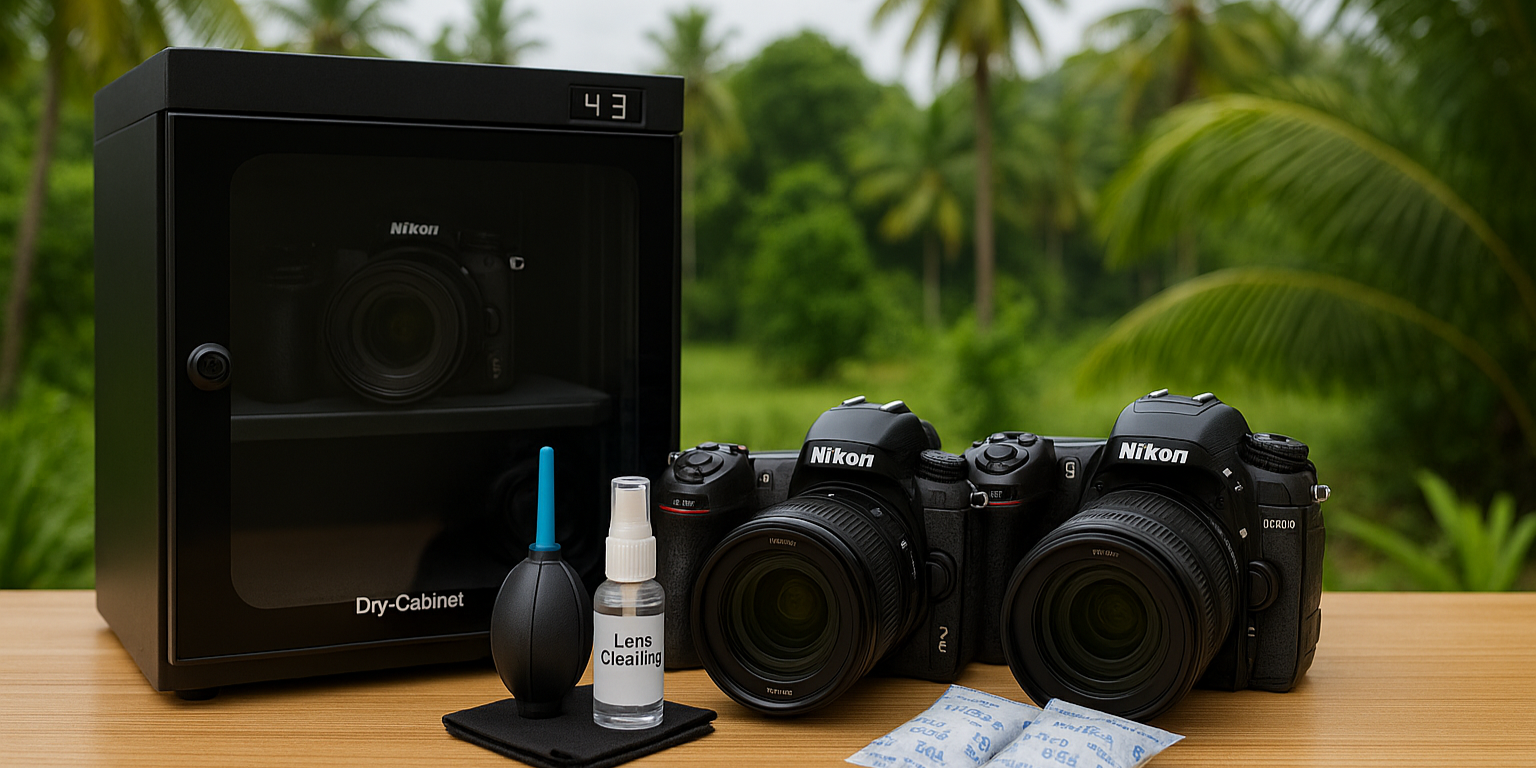
1. Use a Dry Cabinet or Dry Box

  • Store your camera and lenses in a dry cabinet at 40–50% humidity.
  • Affordable dry boxes with silica gel can also work for small setups.

2. Keep Silica Gel Packs in Your Camera Bag

  • These absorb moisture while you’re traveling.
  • Replace them regularly for best results.

3. Wipe Down After Outdoor Use

  • Use a microfiber cloth to clean sweat, dust, or rainwater.
  • Never store your camera while it’s still damp.

4. Avoid Sudden Temperature Changes

  • When moving from AC to outdoors, keep your camera in the bag for a few minutes to avoid condensation.

5. Service Your Camera Regularly

  • Bring your camera and lenses for a professional cleaning at least once a year.
  • The Photo Technica Service Center is equipped with Nikon-certified tools to safely remove fungus and dust.

Camera Care Accessories You Should Use

  • Dry Cabinet (40L–100L size) for safe storage.
  • Lens Cleaning Kit – microfiber cloths, blower, cleaning solution.
  • Silica Gel Packs for travel.
  • Rain Covers for outdoor shoots during monsoon.

Why Choose Photo Technica Service Center in Sri Lanka

  • Official Nikon Authorized Service Center.
  • Certified Technicians trained by Nikon.
  • Genuine Nikon Parts for repairs and replacements.
  • Quick Turnaround for cleaning and servicing.

📍 Location: 288, Galle Road, Colombo 03
📞 Contact for Service: 0765269736

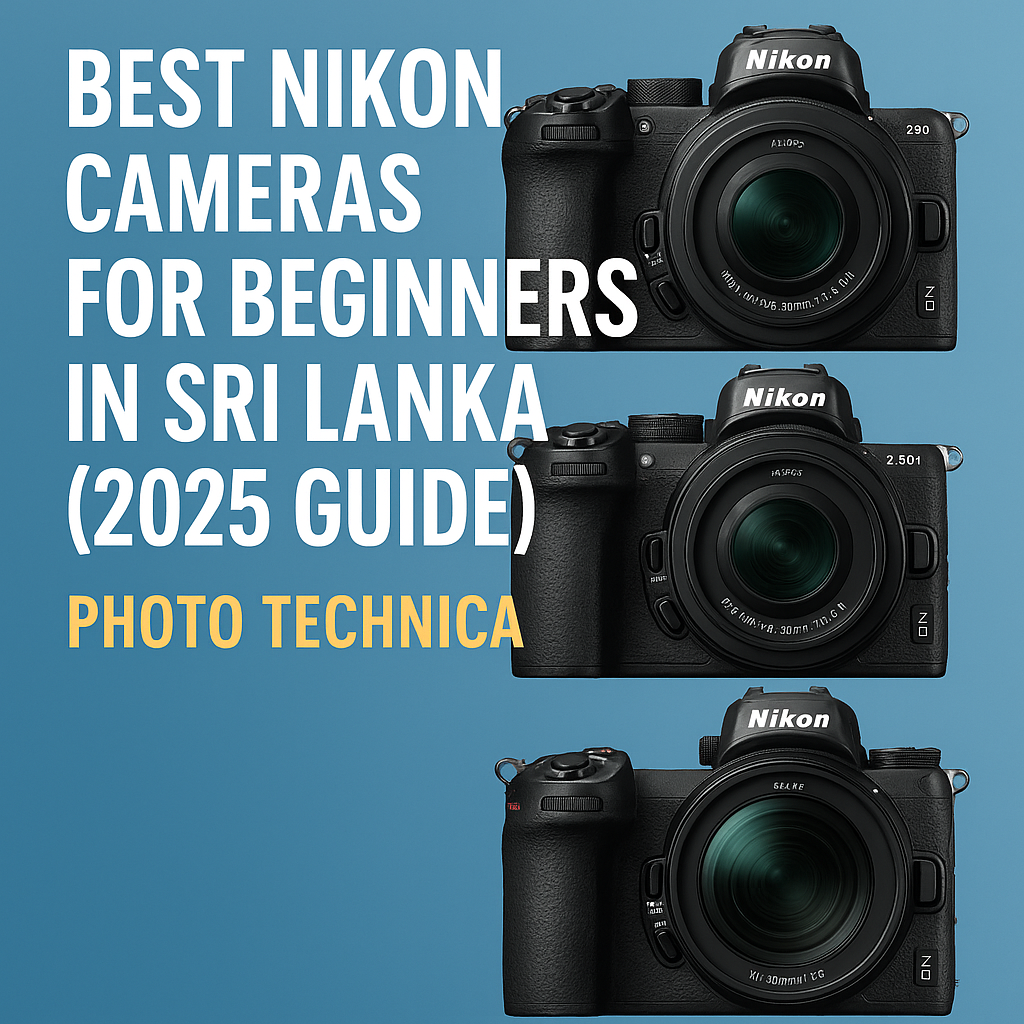
Best Nikon Cameras for Beginners in Sri Lanka (2025 Guide)

Photography is becoming more popular than ever in Sri Lanka, with more people capturing travel memories, wildlife, weddings, and even starting careers as content creators. If you’re just beginning your photography journey, choosing the right camera can feel overwhelming.

That’s why Nikon, trusted worldwide for its quality and innovation, is the best choice for beginners. As the official Nikon distributor in Sri Lanka, Photo Technica is here to guide you to the perfect camera for your needs. In this 2025 guide, we’ll explore the best Nikon cameras for beginners in Sri Lanka and help you decide which one is right for you.


Why Choose Nikon as a Beginner in Sri Lanka?

  • Trusted Brand: Nikon cameras are known for excellent image quality and durability.
  • Easy to Use: Beginner-friendly menus and auto modes make learning photography simple.
  • Wide Lens Selection: From portraits to wildlife, Nikon has lenses for every style.
  • Warranty & Service: With the Nikon Authorized Service Center in Colombo, you’ll always have reliable after-sales support.

Best Nikon Cameras for Beginners in 2025

Here are the top Nikon cameras for beginners available in Sri Lanka this year:

Nikon Z30 – Best for Vloggers & Content Creators

The Nikon Z30 is perfect if you love vlogging, travel videos, and social media content.

  • Compact, lightweight, and easy to carry.
  • Flip-out touchscreen for selfies and vlogs.
  • Shoots 4K video with crystal-clear quality.
  • Affordable entry into Nikon’s mirrorless lineup.

👉 Great for students, content creators, and travelers.


Nikon Z50 II – Best All-Round Starter Camera

The Nikon Z50 II is the upgraded version of the popular Z50, designed as a versatile APS-C mirrorless camera for both photos and videos.

  • 20.9MP sensor with excellent image quality.
  • Faster performance and improved autofocus.
  • Compact body, perfect for everyday use.
  • 4K video recording with reliable tracking.

👉 Ideal for beginners who want a balance of photography and video.


Nikon Z5II – Best Full-Frame Entry-Level Camera

If you want to step up to professional-quality photography, the Nikon Z5II is your gateway into full-frame cameras.

  • Affordable full-frame mirrorless option.
  • Dual card slots for extra security.
  • Excellent image quality, perfect for landscapes and portraits.
  • Upgraded processor for better speed and performance.

👉 A great long-term investment for serious beginners.


📊 Nikon Beginner Camera Comparison (2025)

Here’s a quick comparison of the top 3 beginner-friendly Nikon cameras in Sri Lanka:

CameraSensorBest ForVideoPrice Range (Approx.)
Nikon Z30APS-CVlogging, travel, beginners4KEntry-level
Nikon Z50 IIAPS-CAll-round photography & video4KMid-range
Nikon Z5IIFull-FrameProfessional image quality, portraits, landscapes4KHigher beginner budget

👉 For exact prices in Sri Lanka, contact Photo Technica directly.


Things to Consider Before Buying

  • Budget – Choose a model that fits your price range.
  • Photography Style – Travel, portraits, wildlife, or vlogging?
  • Lens Options – Start with a kit lens, then expand later.
  • Warranty & Service – Always buy from the official Nikon distributor in Sri Lanka for genuine products and after-sales support.

Where to Buy Nikon Cameras in Sri Lanka

Photo Technica is the official Nikon distributor in Sri Lanka. We provide genuine Nikon products with warranty, expert guidance, and after-sales service.

📍 Showroom & Service Center
288, Galle Road, Colombo 03

📞 Contact for Sales:

  • 0768957777
  • 0761996555

📞 Contact for Service Center:

  • 0765269736

🌐 Visit us: www.phototechnicasl.com

Search for products

Back to Top
Product has been added to your cart